
Not finding what you're looking for?
Contact UsIgnoring Users
How ToSometimes a specific account generates a lot of keyword matches that aren’t actually relevant. A bot that reposts every mention of a word. An account that uses your brand name as part of their username. A spammer. All of these can flood your events with noise. Messijo lets you ignore users to filter them out entirely.
Prerequisites
You need at least one active keyword and existing events to review.
What ignoring a user actually does
When you ignore a user:
- No notifications are sent from that user’s posts for the keyword where you added the ignore
- Existing events from that user remain in your dashboard
- The ignore is configured per keyword, with the platform and username stored on that keyword
When to ignore a user
- A bot reposts your keyword frequently. Automated accounts that mirror content can generate dozens of false-positive events per day.
- An account uses your brand name in their username. Every post they make matches your brand keyword but isn’t a real mention.
- A spam account consistently triggers matches with low-quality content.
- A competitor’s account posts about your brand in a way that isn’t useful to track. Though you might want to keep this one. Use your judgment.
When not to ignore a user
Don’t ignore a user when:
- They occasionally post relevant content. Use a Lens instead to classify whether each post is relevant.
- They post both on-topic and off-topic content. Ignoring them loses the on-topic posts.
- You haven’t actually checked what they’re posting. Review their events first.
How to ignore a user
From the keyword form:
- Go to Keywords and click the keyword you want to edit
- Open the Ignored Users section
- Click Add Ignored User
- Select the platform and enter the username
- Save the keyword
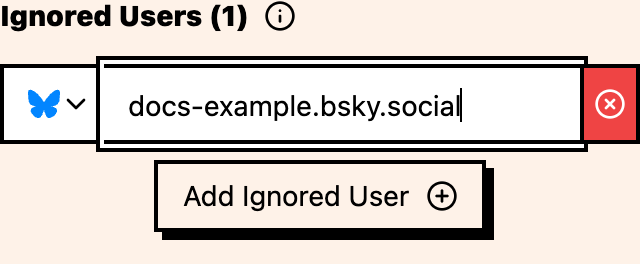
Managing your ignored users
You can view and manage the list at any time:
- Go to Keywords and edit the keyword
- Open the Ignored Users section
- Remove the user row you no longer want to ignore
- Save the keyword
A few things worth knowing
- Review several events from a user before ignoring them. One noisy post isn’t a pattern.
- Ignores include a platform. A user might be noisy on one platform but relevant on another.
- If a user produces a mix of relevant and irrelevant content, a Lens can classify each post rather than blanket-ignoring them.
- Keep a note of why each user was ignored. Six months from now, you’ll look at the list and have no idea why half of them are there.
Where to go next
- Simple vs compound keywords: refine matching to reduce noise
- Whole-word matching: another way to reduce false positives
- Per-platform setup: choose platforms per keyword