
Not finding what you're looking for?
Contact UsCreating Your First Keyword
TutorialA keyword is a word or phrase Messijo watches for across your connected platforms. When someone uses that word in a post or thread, Messijo captures it as an event and can notify you. Let’s set up your first one.
Step 1: Open the Keywords page
Log in and click Keywords in the header navigation. You’ll see a list of your existing keywords (if any) and a button to create a new one.

Step 2: Add a keyword
Click Add Keyword and enter the word or phrase you want to monitor. For your first one, keep it simple: a single word like your brand name or product name.
If your company is called “Acme,” enter acme. Matching is case-insensitive, so “Acme,” “ACME,” and “acme” all match.
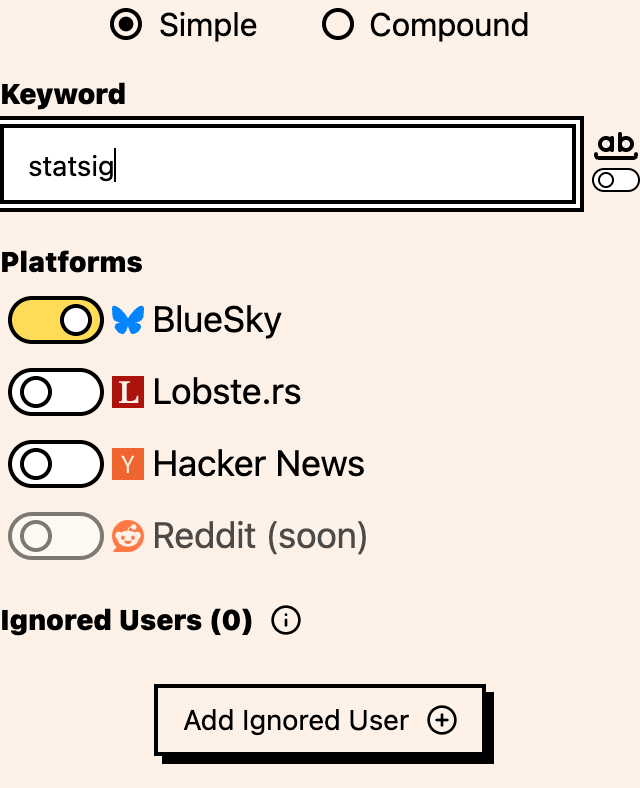
Step 3: Pick your platforms
Select which platforms to monitor for this keyword:
- BlueSky: posts
- Hacker News: posts and comments
- Lobste.rs: stories and comments
You don’t have to select every platform. If you only care about Hacker News, select only Hacker News. You can always change this later. Reddit may appear as a disabled “soon” option, but it is not currently selectable for monitoring.
Step 4: Save
Review your keyword and platform selection, then click Save. Your keyword is active and Messijo starts monitoring immediately.
Step 5: Watch for matches
Within a few minutes, events should start appearing in your dashboard. Each one is a post or thread that matched your keyword. Open the keyword and use its Events page to review the matches for that keyword.
A few things I’d do differently if I were starting over
- Start with one keyword. Multiple keywords on day one means a flood of events you can’t keep up with.
- Use specific terms. “acme” is fine. “tool” will match half the internet.
- Add keywords gradually as you get comfortable with the workflow.
- If a single word is too broad (like “apple”), look into compound keywords before you create a dozen separate ones.
Where to go next
- Set up notifications so you know when matches are found
- Understand events to learn what data Messijo captures
- Explore simple vs compound keywords for more precise matching