Not finding what you're looking for?
Contact UsNo Mentions Appearing
How ToYou’ve set up keywords but nothing’s showing up in your dashboard. Here are the common causes and how to fix each one.
Prerequisites
You need at least one keyword configured.
Quick checklist
- ✅ Keyword is active (not paused)
- ✅ At least one platform is selected for the keyword
- ✅ You haven’t hit your event quota
- ✅ Your keyword isn’t too specific (compound keywords with too many conditions)
- ✅ The platform actually has posts mentioning your keyword
Cause 1: Keyword is paused or inactive
Symptom: No events at all, even for keywords that should be common.
Check:
- Go to Keywords in your dashboard
- Look at the status column: is the keyword marked as “Active” or “Paused”?
- If paused, click the toggle to activate it
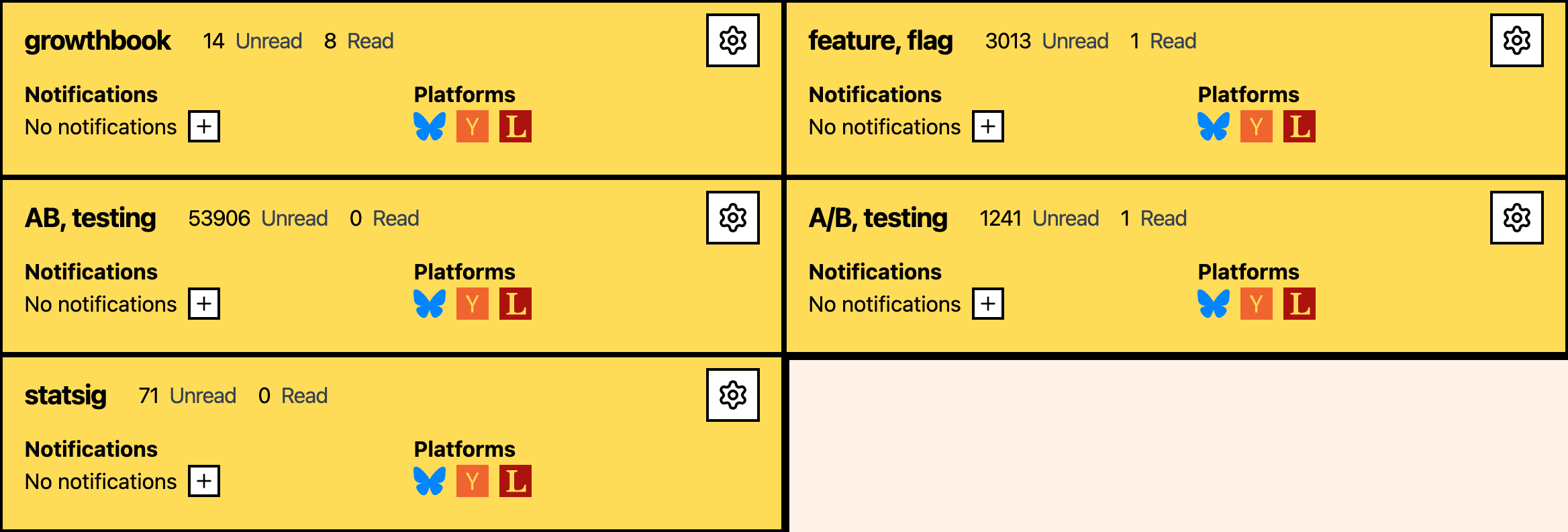
Fix: Activate the keyword. Events should start appearing within a few minutes.
Cause 2: No platforms selected
Symptom: Keyword is active but no events appear.
Check:
- Go to Keywords and click the keyword to edit
- Look at the Platforms section
- Are any platforms checked?
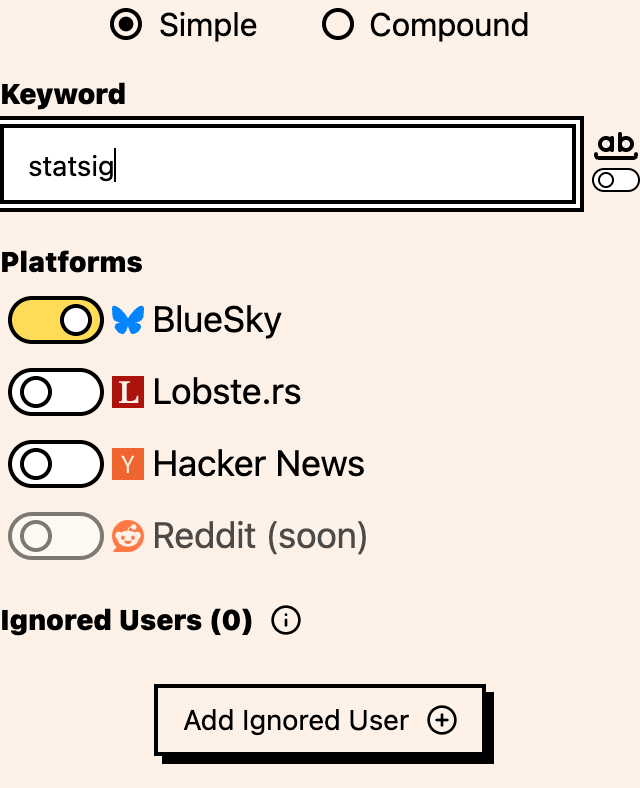
Fix: Select at least one platform. If no platforms are selected, Messijo has nowhere to look for matches. Save the keyword after selecting platforms.
Cause 3: Event quota reached
Symptom: Events were appearing but suddenly stopped, and you haven’t changed any keywords.
Check:
- Go to your Dashboard home
- Look at the event quota usage (e.g., “5,000 / 5,000”)
- If you’ve reached your limit, new events stop being collected

Fix:
- Wait for quota reset: quotas reset at your next billing date
- Upgrade your plan: go to Settings → Billing → Manage Subscription
- Reduce noise: remove or pause keywords that generate low-value events
Cause 4: Keyword is too specific
Symptom: Some keywords produce events but a specific compound keyword doesn’t.
Check:
- Go to Keywords and look at the keyword in question
- Is it a compound keyword with AND/NOT conditions?
- Are the conditions too restrictive?
Example: acme AND competitor AND review NOT positive: this requires all of “acme,” “competitor,” and “review” in the same post while excluding “positive.” Very few posts will match all of that.
Fix:
- Simplify the compound keyword: remove conditions one at a time
- Try the keyword as a simple keyword first to see if it matches at all
- Use Lenses instead of compound keywords for nuanced filtering
Cause 5: Whole-word matching is too strict
Symptom: Keyword doesn’t match when you expect it should.
Check:
- Go to Keywords and click the keyword to edit
- Check if Whole-word matching is enabled
- Think about how your keyword appears in posts: is it often part of a larger word?
Example: Keyword “art” with whole-word matching won’t match “artwork,” “article,” or “smart.”
Fix:
- Disable whole-word matching if you want to catch partial matches
- Or use a more specific keyword that doesn’t appear inside common words
Cause 6: All relevant users are ignored
Symptom: You know mentions exist (you’ve seen them manually on the platform) but they don’t appear in Messijo.
Check:
- Go to Keywords and edit the keyword that should have matched
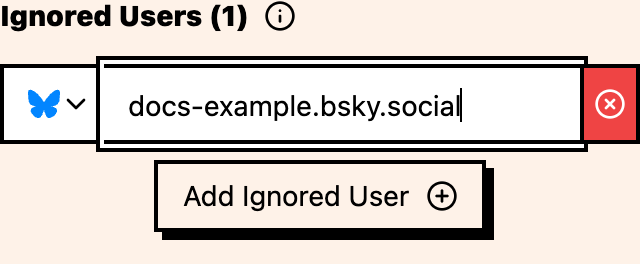
- Open the Ignored Users section
- Check if the users who posted the mentions you’re looking for are on the keyword’s ignore list
Fix: Remove the user from the ignored list if their posts are actually relevant.
Cause 7: Nobody’s talking about your keyword on that platform
Symptom: Keyword is active with platforms selected, but no events appear.
Check:
- Go to a selected platform, such as Hacker News, BlueSky, or Lobste.rs, and search for your keyword manually
- If there are no recent posts mentioning your keyword, there are no events to capture
Fix:
- This isn’t a bug. Messijo can only capture mentions that exist.
- Try broadening your keyword (e.g., add related terms as separate keywords)
- Check different platforms: your keyword might be discussed on platforms you haven’t selected
Cause 8: Lens is filtering everything
Symptom: Events appear in the dashboard but notifications aren’t being sent.
Check:
- Go to Keywords and open the keyword that should have matches
- On the keyword’s Events page, check if a Lens is selected
- Select the Lens from the Lenses card. Are there no events in the Lens-filtered list?
Fix:
- Review and adjust the Lens prompt
- Clear the Lens filter to review all events for the keyword

Still not working?
If you’ve checked all the above and still aren’t seeing mentions, contact support at [email protected] with:
- Your keyword configuration (keyword text, platforms, compound conditions)
- The platform and post URL where you expected a match
- When you expected the match to appear
We’ll investigate whether the post was missed and why.
Where to go next
- Too many false positives: the opposite problem
- Notifications not arriving: events appear but no alerts
- Creating your first keyword: verify your keyword setup